

Articles
Part 1 argued that “using AI” and “orchestrating AI” are two different animals. One is a chat window. The other is infrastructure. We covered why ad-hoc prompting collapses at scale, laid out a five-tier architecture (Ingress, Context Assembly, Prompt Engine, Model Interaction, Egress & Routing), and made the case that security has to live inside the pipeline itself. If it depends on people remembering a policy, it will fail. People forget things.
This installment is the build. The real tool-use loop, not the hand-wavy version. Where multi-step chains actually break. Whether you should be writing any of this plumbing yourself in 2026 (mostly no, and I’ll tell you when the answer flips to yes). Six practices from deployments in regulated industries, including one that never shows up in articles like this until it has already burned someone: model deprecation. And at the end, the metrics that matter, including my favorite cost metric, the one everyone leaves out.
Tool Use, Function Calling, and Multi-Step Chains
Tool Use and Function Calling
The whole trick of orchestration comes down to one shift. Stop asking Claude to describe what should happen. Give it tools it can invoke, and let your code decide whether each invocation actually runs.
That second half is the part people skim past, and it’s the part I care about most. Claude never touches your CRM, your ticketing system, or your database. It hands back a structured request: this tool, these parameters. Your orchestration layer reads that request and gets to say yes, no, or “log it and ask a human.” The model reasons. You execute. Keep those jobs separate and half your security problems shrink on their own.
Now, the loop. Most articles print the tool definitions, then wave at everything else with a comment that says “loop until done.” I find that mildly infuriating, because the loop is the orchestrator. So here it is in full, stop-reason handling and all:
import anthropic
client = anthropic.Anthropic()
MODEL = “claude-sonnet-4-6” # resolve from config in production, see Practice 3
tools = [
{“name”: “lookup_customer”,
“description”: “Retrieve customer record by email or account ID.”,
“input_schema”: {“type”: “object”,
“properties”: {“identifier”: {“type”: “string”}},
“required”: [“identifier”]}},
{“name”: “create_ticket”,
“description”: “Create a support ticket in the ticketing system.”,
“input_schema”: {“type”: “object”,
“properties”: {“summary”: {“type”: “string”},
“priority”: {“type”: “string”,
“enum”: [“low”, “normal”, “high”]}},
“required”: [“summary”, “priority”]}},
{“name”: “escalate_to_human”,
“description”: “Route the case to a human agent.”,
“input_schema”: {“type”: “object”,
“properties”: {“reason”: {“type”: “string”}},
“required”: [“reason”]}},
]
ALLOWED_TOOLS = {t[“name”] for t in tools}
MAX_TURNS = 10 # a runaway loop is a cost incident waiting to happen
messages = [{“role”: “user”, “content”: inbound_customer_message}]
for turn in range(MAX_TURNS):
response = client.messages.create(
model=MODEL,
max_tokens=1024,
system=TRIAGE_SYSTEM_PROMPT, # versioned, pulled from the prompt registry
tools=tools,
messages=messages,
)
if response.stop_reason != “tool_use”:
break # model is done reasoning; response.content holds the final answer
# Append the assistant turn, then execute every requested tool call
messages.append({“role”: “assistant”, “content”: response.content})
tool_results = []
for block in response.content:
if block.type != “tool_use”:
continue
if block.name not in ALLOWED_TOOLS: # server-side gate,
result = {“error”: “tool not permitted”} # never trust the request
else:
result = execute_tool(block.name, block.input) # your code, your rules
tool_results.append({“type”: “tool_result”,
“tool_use_id”: block.id,
“content”: str(result)})
messages.append({“role”: “user”, “content”: tool_results})
else:
escalate_to_human(reason=”turn limit reached without resolution”)
Code Listing 1: The complete tool-use orchestration loop. The parts most articles skip are the parts that matter in production.
Three details in that loop earn their keep. The stop_reason check is how the model tells you whether it wants tools or is finished. Skip it and you either cut the model off mid-task or loop forever. The allow-list gate runs server-side on every request, because a tool-use response is a request, not a command. Treat it as trusted input and you’ve built the exact mechanism an injection attack needs (Practice 4 gets into this). And the turn cap? That one I insist on. “Loop until done” without a ceiling is an open-ended spend authorization. I watched a workflow chew through a full day’s token budget in about forty minutes because a tool kept returning an error message the model read as “try again, slightly differently.” The cap costs one line. Write the line.
One more thing before we move on: MCP. If the systems you’re connecting already speak Model Context Protocol, you may not need to hand-write these tool definitions at all, and it has genuinely become the standard for this. Use it for internal systems you control. But I’d treat third-party MCP servers the way you’d treat any unvetted dependency, which is to say, with suspicion. Tool descriptions themselves are an injection vector. There’s a name for it now, “tool poisoning,” and it’s been seen in the wild. MCP saves you integration work. It does not save you the security review. Nothing saves you the security review.
Multi-Step Chains and Agentic Patterns
Some workflows fit in one Claude call. Fewer than you’d think. Contract analysis, multi-source research, code review pipelines, these are sequences, where each reasoning step feeds the next and the path can fork based on what turns up.
Picture a three-step contract review. Extract the key clauses. Check them against the policy library. Produce a risk summary with anything questionable flagged for a human. Each step gets its own prompt, its own tool set, its own log entry, and the orchestration layer stitches it together.
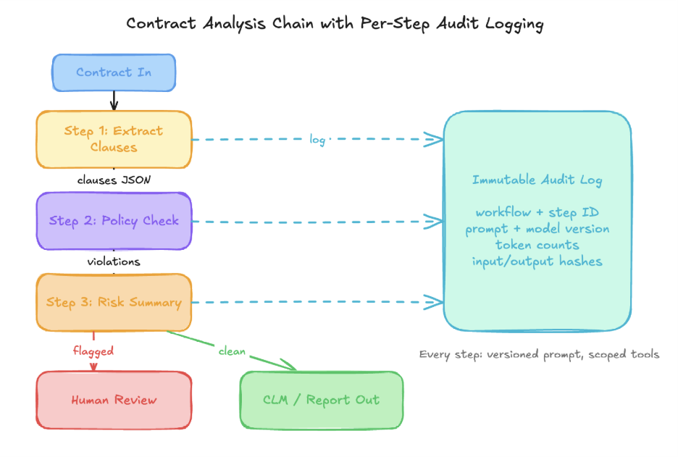
Before you build that layer, though, ask whether you should build it at all. My answer, after doing it both ways: probably not. Temporal, LangGraph, Anthropic’s Agent SDK, these exist precisely to handle the retry, checkpointing, and state machinery I’m about to describe. Hand-roll only if a compliance requirement forces you to own every line (some regulated shops genuinely face this) or if the workflow is so simple that a framework’s dependency surface costs more than it saves. Everything else, buy the machinery and spend your team’s hours on the two tiers nobody can buy for you: context assembly and egress validation. That’s where your business actually lives.
Build or buy, three properties are non-negotiable.
- Idempotency. Every step must be safely re-runnable. When Step 2 fails, and it will fail, the orchestrator retries Step 2 without re-running Step 1. That means each step’s input has to be reconstructable, and side effects like database writes or ticket creation need idempotency keys or a pre-write existence check. The classic version of this failure: a retry storm during an API slowdown once produced forty-one duplicate tickets from a single inbound email, because ticket creation had no idempotency key. Forty-one. The fix was one column and a unique constraint.
- Context windowing. Don’t forward the whole conversation history to every step. Pass what the step needs, nothing else. Current Claude models will happily accept a million tokens of context, which makes forwarding everything tempting, and I’ll admit the temptation is real because trimming context is fiddly work. Resist anyway. Every forwarded token is billed, irrelevant context measurably degrades quality on long chains, and it’s a data-exposure question besides. Step 3 of a contract review has no reason to see the raw document text. So don’t show it the raw document text.
- Circuit breakers. Consecutive failures on the same step should halt the chain and page someone, not loop forever burning tokens. Retry ceiling per step, exponential backoff with jitter, and, this is the part teams skip, a written decision about what “exhausted retries” means. Queue for manual review? Alert on-call? Fall back to a simpler workflow? Decide before launch. Deciding during the incident gets you a stuck queue and an angry engineer at 2 a.m., usually both.
Preparing Your Organization for Orchestrated AI
The code is the easy part. I keep saying this and people keep not believing me.
Prerequisites and Readiness Checklist
Here’s what has to exist before your first orchestrated workflow ships. Not “should.” Has to. Skipping this list doesn’t create technical debt, it creates security exposure with a compliance problem attached, and that combination is far more expensive to unwind later.
Infrastructure. API access sized to your real projected volume, not the optimistic number from the planning deck. A secrets manager (Vault, AWS Secrets Manager, GCP Secret Manager) already wired into CI/CD, not bolted on in month three. An observability stack that ingests custom spans per orchestration step. My litmus test: if you can’t tell me your contract workflow’s Step 2 latency at p95 this week, right now, off the dashboard, you’re not ready to ship. Harsh, maybe. Also true.
Data. A classification inventory before any source connects: what lives where, how sensitive it is, who’s allowed to touch it. PII redaction tested against real samples, because synthetic records lie to you. Regex pipelines fail on the boring stuff constantly: international phone formats, hyphenated surnames, identifiers that look random but aren’t. And if a workflow needs RAG grounding, validate retrieval accuracy on representative queries first. Retrieval that’s 80% right feels fine in a demo and poisons everything downstream in production.
Governance. An AI-use policy with actual teeth. Not “use AI responsibly,” which means nothing, but a list: these use cases are in, these are out, this person approves prompts, this person approves deployment. Plus an incident playbook written while everyone is calm. What happens when the model returns PII the redaction layer should have caught? When an injection lands? When a workflow has been quietly wrong for two days? If the answer is “we’d figure it out,” you don’t have a playbook, you have a hope.
Common Pitfalls
None of these are exotic. They show up in nearly every deployment that didn’t plan for them, which is most deployments.
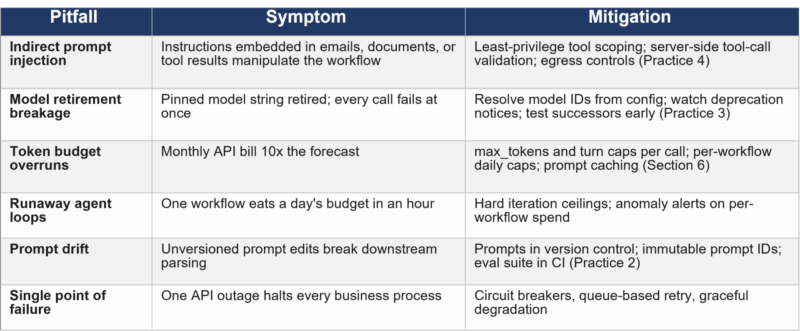
Every one of these is cheap to prevent and expensive to fix. A circuit breaker is ten lines when you write the step the first time. Retrofitting one into a live system is a two-week project wearing a change-control process. Same math for model-ID abstraction, prompt versioning, injection defenses. Pay now. It’s less.
Best Practices for Secure, Scalable Claude Deployments
Six practices. I’d call them table stakes, not aspirations, for anything carrying a production SLA.
Treat Prompts as Code, and Test Them Like Code
A prompt edit can break a workflow as thoroughly as a bad deploy. Output shifts just enough that downstream logic misfires. The model starts favoring a different tool. Results look right and aren’t. And none of it appears in a code diff, because someone edited a text field in a database and clicked save.
Version control is the floor, not the finish. “Tested in CI” has to mean something concrete: an eval suite, a fixed set of representative inputs with graded assertions on the outputs, running on every prompt change, with a regression baseline per version. Tools like promptfoo turn this into a config file instead of a project, so there’s really no excuse anymore. For the high-stakes stuff, add canary rollout: send a small traffic slice to the new prompt, compare quality metrics against the incumbent, promote when the numbers hold. And keep a registry mapping each workflow step to a pinned prompt version, so rollback is a pointer change rather than an archaeology dig.
Use Structured Outputs, and Still Validate
For any response that feeds a downstream system, use the API’s native structured outputs. Pass your JSON schema through the output_format parameter and constrained decoding does the rest: the model is grammatically prevented from emitting tokens that violate the schema. For tool inputs, strict: true gives the same guarantee on parameters. This flatly replaces the old ritual of prompting for JSON, parsing, praying, retrying. If your codebase still has retry-on-malformed-JSON logic, that’s not a defense layer, that’s a fossil. It means the integration predates the feature.
{
“$schema”: “http://json-schema.org/draft-07/schema#”,
“type”: “object”,
“properties”: {
“document_type”: { “type”: “string”, “enum”: [“msa”, “sow”, “nda”, “amendment”] },
“confidence”: { “type”: “number”, “minimum”: 0.0, “maximum”: 1.0 },
“extracted_entities”: { “type”: “array”, “items”: { “type”: “string” } },
“requires_human_review”: { “type”: “boolean” }
},
“required”: [“document_type”, “confidence”, “requires_human_review”]
}
Code Listing 2: JSON schema passed via output_format for constrained decoding, then reused server-side as a validation gate.
So why keep validating server-side, if the API guarantees the format? Two reasons, and I hold the second one more strongly. First, defense in depth. Your egress layer shouldn’t trust any upstream component, including the API. Schemas drift, headers get dropped in refactors, someone routes traffic through a gateway that strips a parameter. Cheap insurance. Second: schema-valid does not mean correct. Constrained decoding guarantees the shape of the answer, not the substance. A confidence of 0.97 on a misclassified document validates beautifully. The schema gate catches format failures. Your quality metrics catch the rest, and the teams who decide structured outputs “solved” accuracy are the teams who learn otherwise from a customer email.
Manage the Model Lifecycle Deliberately
This is the practice that never makes these articles, and the industry spent 2025 and 2026 learning it the hard way: models retire, and they retire faster than your release cycle. Anthropic’s cadence has been aggressive. Whole generations have gone from launch to shutdown in under two years, with roughly sixty days between deprecation notice and the lights going out. A pinned model string in production is a time bomb, and unlike most time bombs, this one publishes its detonation date. Somehow teams still get surprised.
Treat model identity like any other versioned dependency. Resolve model IDs from configuration, never from string literals scattered through the codebase, so a migration is one config change instead of a repo-wide grep-and-pray. Put retirement dates on the team calendar the day the notice lands. And, the step that matters most: run your eval suite against the successor model the week it’s announced, not the week before shutdown. Successors are usually better. “Usually better” and “behaves identically on your prompts” are very different claims. Output length shifts, tool-calling eagerness shifts, format adherence shifts, and newer models have removed API parameters that older integrations still send, which turns your migration into a 400 error. Sixty days is plenty of time to catch all of that. Six days is not.
Tag every observability span with the resolved model version (Practice 5) and “what’s still calling the deprecated model” becomes a dashboard filter instead of an investigation.
Defense in Depth Against Prompt Injection. Assume It Sometimes Works.
Let me start with the uncomfortable part: prompt injection has no complete fix. It has sat at the top of the OWASP LLM risk list for years, published attack success rates against well-defended systems remain material, and the vendors themselves have conceded it may never be fully solved. So drop “prevent injection” as a design goal. The real goal is to make a successful injection boring. Contain the blast radius until a hijacked reasoning step can’t do anything expensive.
And know where the attacks actually come from, because it’s probably not where you’re looking. In an orchestrated pipeline the dangerous vector is rarely a user typing “ignore previous instructions.” It’s indirect injection: instructions embedded in the content your workflow processes. The email being triaged. The contract being analyzed. The web page a research step fetches. The tool result from a third-party system. The metadata of an MCP tool description. Your workflow reads it as context. The attacker wrote it as instructions.
Layer your defenses in order of what actually holds.
- Least-privilege tool scoping matters most. Each workflow step gets exactly the tools it needs, enforced server-side by the allow-list gate from Code Listing 1, evaluated per step, not per workflow. A contract-analysis step has no business invoking send_email, and if the gate works, it doesn’t matter how persuasively an injected instruction asks.
- Egress controls come second. Validate not just the shape of outputs but where they’re allowed to go. Exfiltration via injected “summarize this and send it to…” instructions is a documented, in-the-wild pattern. Downstream routing should be a fixed property of the workflow definition. The model’s output never gets a vote on destinations.
- Human gates on irreversible actions. Anything that moves money, deletes data, or leaves the building gets a human approval step. Full stop, no exceptions, even when it’s annoying. Especially when it’s annoying. This is the backstop for whatever the other layers miss.
- Prompt separation and input screening still belong in the stack, and here I’ll admit some ambivalence, because I just spent two paragraphs telling you they’re weak. Trusted instructions in the system parameter, untrusted content in messages, screening for known patterns and obfuscation tricks like encoded payloads and zero-width characters. Build all of it. Just be honest about what it is: friction, not a boundary. Encoding defeats pattern filters, and the system prompt is a strong signal the model usually honors, not a guarantee. Friction still slows attackers down, and slowing them down has value. It’s just not where your threat model gets to rest.
- Output monitoring closes the loop. A response that discloses the system prompt, references out-of-scope tools, or deviates from expected format should raise an alert, not glide through. Log these as security events. The trend line on attempts is itself a metric.
Then attack it yourself. Quarterly red-team exercises against your own workflows, with current attack patterns, feeding findings back into the gates. A defense stack you’ve never attacked isn’t a control. It’s a hypothesis with good marketing.
Build Observability from Day One
Per orchestration step, capture: timestamp, workflow ID, step ID, resolved model version, input and output token counts, cache read and write counts, latency, validation result, and a hash of the input and output. The hash is for forensics. When something goes sideways three days from now, you’ll want to reconstruct exactly what went in and what came out, and “roughly what went in” doesn’t survive an audit. The model version tag makes Practice 3 auditable. The cache counters make Section 6 possible.
Pipe it all into whatever you already run, Datadog, Grafana, Splunk, and set anomaly alerts before launch, not after the first incident. A retry-rate spike is usually the first sign of a prompt regression. Creeping latency usually means context is bloating upstream. And a falling cache hit rate right after a deploy means somebody reordered the prompt and broke the cache prefix, which you will otherwise discover on the invoice, which is the worst possible dashboard.
Dashboards for their own sake bore me. The point is the feedback loop. If the observability data isn’t actively driving prompt tuning and workflow refinement, you’ve built a very expensive screensaver.
Design Human-in-the-Loop In, Not On
Every workflow hits cases the model can’t resolve cleanly. That isn’t a flaw to engineer away, it’s the permanent condition of pointing AI at the real world. The question was never whether you need an escalation path. It’s whether you designed one or just hoped.
Define the triggers upfront: confidence under threshold, a flagged data category in the input, the model expressing uncertainty, a tool-call pattern that says the workflow has wandered somewhere strange, and, per Practice 4, anything irreversible. When a trigger fires, the reviewer needs the whole picture in one place: original input, the model’s reasoning, the proposed action, intermediate outputs. If they have to reconstruct it from logs, you’ve built the escalation path but not the escalation.
Two failure modes, both common. The workflow that fails silently because nobody built the off-ramp. And the off-ramp that fires but hands the reviewer a context-free ticket, so they spend thirty minutes doing archaeology before they can even start reviewing. The handoff is a UX problem wearing an engineering costume. Design it for the person who receives it.
Measuring Success. KPIs for AI Orchestration
Shipping is a milestone, not the finish line. You want to know whether the thing is working, degrading, quietly getting expensive, or growing security gaps, and you want to know before anyone else does.
Operational metrics tell you whether the system is reliable. Latency at p50, p95, p99. Step-level success and retry rates. Escalation rates. API errors broken down by type. When these drift the wrong way, something upstream is wrong, and you’d rather find it than have users find it for you.
Quality metrics tell you whether the outputs are any good, and with structured outputs handling format, these now carry the entire weight of correctness. Periodic human review, meaning a person actually grading samples against ground truth on a schedule, tracked per prompt version so your eval baseline stays honest. Hallucination rates from grounding checks. Satisfaction scores for anything customer-facing. Schema pass rate is a floor. Don’t confuse it with a ceiling.
Cost metrics tell you whether it’s sustainable, and here’s my favorite, the one every KPI list omits: prompt cache hit rate. Cached input tokens bill at a fraction of the standard rate, and orchestrated workflows are ideal caching candidates because the system prompt, tool definitions, and reference context repeat on every single call. Put the stable content first, since cache prefixes are order-sensitive, and watch the hit rate the way you watch latency. A well-cached workflow runs at a fraction of the naive cost. A broken cache prefix is invisible until the bill lands. Alongside it, track spend per workflow, cost per successful completion, and token efficiency, useful output tokens over total consumed, which exposes bloated prompts before finance notices the variance.
Security metrics tell you whether the defenses are holding. Injection attempts detected, including indirect attempts caught in processed content, which is where the trend line actually matters. PII exposure events, where the target is zero and any nonzero number is a serious incident, not a statistic. Tool calls blocked by the allow-list gate. Mean time to detect and respond to AI-specific security events.
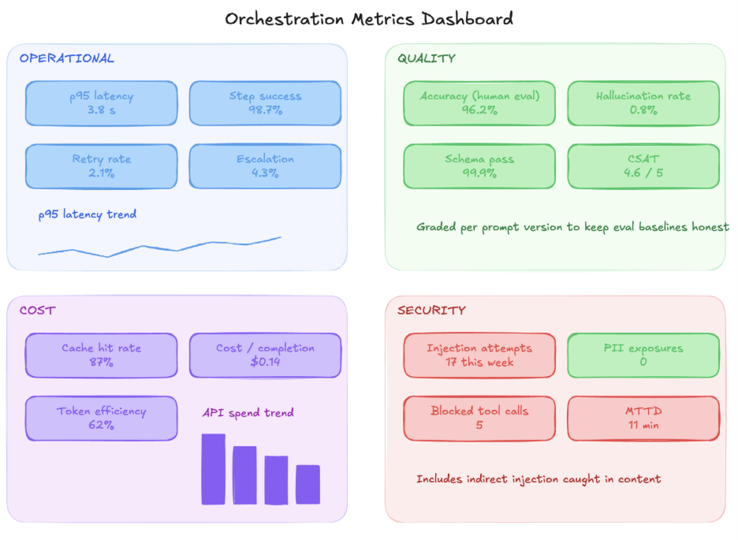
Read all four together or don’t bother. Great latency with sliding accuracy is a slow-motion disaster. Perfect quality with a broken cache is a budget problem in a quality costume. Solid operational numbers with zero security visibility is a breach on layaway. The picture is the product.
Conclusion. From Experiment to Enterprise Capability
Most organizations are stuck in the middle right now. Past the proof of concept, not yet at the point where they’d stake critical operations on an orchestrated pipeline. What separates the two states isn’t model capability, and honestly it never was. It’s discipline. Prompts in version control with eval suites behind them. Model versions managed like the dependencies they are. Injection defenses aimed at the attacks that actually happen. Audit records that would survive a compliance review without anyone sweating.
The teams that cross fastest share a few habits. They pick one workflow and get it genuinely right, then use it as the proof point that earns the next one. They build security in during the first sprint. They buy the orchestration machinery instead of hand-rolling it and spend the saved hours on the parts unique to their business. And they instrument everything, because they’d rather know than guess.
Architecture beats model selection. A well-built pipeline around a mid-tier model outperforms a frontier model dropped into chaos. The model is one component, and it’s a component that gets replaced on someone else’s schedule. That’s precisely why the system around it matters more.
Security can’t be retrofitted. Tool scoping, egress validation, PII redaction, human gates: initial design or bust. And the threat model has to cover the content your workflows process, not just the users who trigger them, because that’s where the attacks actually arrive.
Measurement makes improvement possible. Without the four metric categories feeding back into the system, you’re flying blind and calling it confidence. The metrics aren’t overhead. They’re the difference between a deployment and a capability.
Where to Start
- Audit what you already have. Find your highest-volume isolated AI queries. The ones with clear inputs and outputs are your orchestration candidates. While you’re in there, grep for hardcoded model strings. You’ll want that list within sixty days whether you orchestrate anything or not.
- Foundation before workflow. Secrets management, PII redaction, observability, and a model-ID config layer exist before the first step gets built. Not after. There is no after, only incidents.
- One workflow, finished properly. Five tiers, the full loop with server-side gates, structured outputs plus defense-in-depth validation, every step instrumented. Right once. Then replicate.
- Governance rituals. Evals on every prompt change. Monthly cost audits with cache hit rate on the agenda. Quarterly red-teaming, indirect vectors included. Successor-model testing within a week of every deprecation notice.
- Then iterate. Tighten prompts against quality data. Grow the tool set as the business grows. Add workflows where the pattern has proven out. The first deployment isn’t the destination. It’s the template.
Part 2 of the AI Orchestration series. Part 1 covered the case for orchestration and the five-tier reference architecture. Part 3 heads into advanced territory: parallel step execution, a deeper look at framework selection, and what enterprise-scale volume actually does to all of this.